Top-Rated All-in-One Printers for Small Businesses in 2026
Last updated: August 2026
Choosing the Right Printer and Optimizing Your Office for Cost Savings
For small businesses, investing in an all-in-one printer is about more than just printing. The right multifunction printer (MFP) can handle copying, scanning, and faxing while integrating seamlessly with your office workflows. But beyond the device itself, working with a single-source provider who offers help desk support, managed IT services, and managed print services (MPS) can significantly cut costs and improve efficiency.
In this guide, we’ll highlight the best all-in-one printers for small businesses in 2026, break down their key features and pricing, and explain how partnering with a trusted technology provider can optimize your entire office operation.
Top-Rated All-in-One Printers for Small Businesses in 2026
We’ve selected five top-rated all-in-one printers based on their performance, features, and cost-effectiveness for small business environments.
Best for: Small offices needing high-quality color printing with security features
| Print Speed | 28 pages per minute (ppm) |
| Print Resolution | 600 x 600 dpi |
| Paper Capacity | 300 sheets (expandable to 850) |
| Connectivity | Wi-Fi, Ethernet, USB, mobile printing |
| Security Features | PIN-based document release, encrypted PDF scanning |
| MSRP | $599 |
Why it’s great for small businesses: The Canon imageCLASS MF743Cdw delivers fast, high-resolution color prints with built-in security, making it ideal for businesses that handle sensitive information. It’s also cost-effective, with high-yield toner cartridges that reduce cost per page.

2. HP Color LaserJet Pro MFP M479fdw
Best for: Small teams needing a reliable, high-speed printer
| Print Speed | 28 ppm |
| Print Resolution | 600 x 600 dpi |
| Paper Capacity | 300 sheets |
| Connectivity | Wi-Fi, Bluetooth, Ethernet, mobile printing |
| Security Features | HP Wolf Security for real-time threat detection |
| MSRP | $649 |
Why it’s great for small businesses: The HP M479fdw is designed for growing teams, with fast print speeds and enterprise-level security. Its smart energy-saving features and low maintenance requirements make it an efficient choice for small businesses.

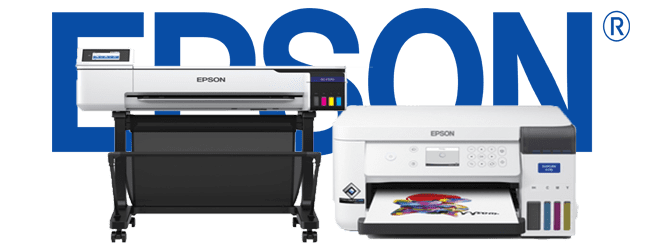
Best for: Cost-conscious businesses needing high-volume printing
| Print Speed | 25 ppm |
| Print Resolution | 4800 x 1200 dpi |
| Paper Capacity | 500 sheets |
| Connectivity | Wi-Fi, Ethernet, USB, mobile printing |
| Ink System | Refillable ink tanks (ultra-low-cost per page) |
| MSRP | $849 |
Why it’s great for small businesses: The EcoTank Pro ET-5850 eliminates expensive toner cartridges, replacing them with high-capacity refillable ink tanks. This drastically reduces operating costs over time, making it a smart investment for businesses with high print volumes.
Best for: Budget-conscious businesses needing high-quality monochrome printing
| Print Speed | 37 ppm |
| Print Resolution | 1200 x 1200 dpi |
| Paper Capacity | 250 sheets (expandable) |
| Connectivity | Wi-Fi, Ethernet, USB |
| Toner Yield | High-capacity toner reduces operating costs |
| MSRP | $399 |
Why it’s great for small businesses: The Kyocera ECOSYS M2635dw is a low-cost, high-speed monochrome printer with long-life components, which means lower maintenance costs over time. If your business primarily prints black-and-white documents, this is an excellent value option.

Best for: Businesses that need professional-quality color printing with modern security built in
| Print Speed | Up to 42 ppm |
| Print Resolution | 1200 x 1200 dpi |
| Best Fit | Workteams of 2–10 users, up to 10,000 pages/month |
| Connectivity | Wi-Fi, Ethernet, USB, NFC tap-to-pair, mobile printing |
| Security Features | Xerox ConnectKey Technology — built-in threat detection and access controls |
| MSRP | $999 |
Why it’s great for small businesses: The VersaLink C415 brings enterprise-grade security and a 7-inch tablet-style touchscreen to a compact A4 footprint, with step-by-step setup that doesn’t require an IT visit. If your business prints marketing materials, reports, or client-facing documents, it delivers professional-quality color output with the kind of built-in ConnectKey security that regulated industries increasingly expect from a networked device.

Why a Single-Source Provider Is the Smartest Business Move in 2026
Choosing the right all-in-one printer is just the beginning. The real key to reducing costs and increasing productivity is working with a single-source provider — the same principle behind why more Colorado businesses are consolidating copier, IT, and security under one provider instead of managing separate vendors for each piece. That provider should offer:
|
✔️ Help Desk Support A dedicated IT help desk means no more troubleshooting printer issues yourself. Your employees stay focused on their work instead of spending hours on driver installations, network problems, or error codes. |
✔️ Managed Print Services (MPS) MPS ensures your business has the right devices, automated toner replenishment, and proactive maintenance to prevent downtime — plus recommendations to reduce waste and switch to more efficient devices. |
|
✔️ Managed IT Services A fully integrated IT strategy lets your printer fleet connect seamlessly with your business network — secure print solutions, cloud printing for remote work, and automated software updates and patches. |
✔️ Cost Reduction Through Office-Wide Optimization A single-source provider doesn’t just manage your printers — they look at your entire office environment and cut costs by eliminating unnecessary devices, reducing energy use, and streamlining workflows. |
|
Invest in More Than Just a Printer Finding the best all-in-one printer is an important decision, but true cost savings and efficiency come from a comprehensive office solution. By working with a single-source provider, you ensure your devices are optimized, supported, and secured — allowing your business to focus on growth rather than IT headaches. If you’re looking to upgrade your office with the right all-in-one printer and integrate help desk support, managed print services, and managed IT, contact us today — we’ll help you choose the best solution tailored to your business needs. |