Commercial Printing Solutions • Office Technology • Colorado
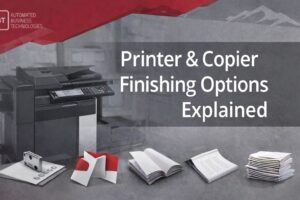
Printer & Copier Finishing Options Explained: Stapling, Hole Punch, Booklets, Folding & More
If your team prints packets, proposals, training materials, or plan sets, finishing features can save hours every month.
This guide breaks down the most useful printer and copier finishing options—what they do, when you need them, and what to ask before you lease.
What “finishing” means (in plain English)
Finishing is everything your printer/copier does after printing—like sorting pages into sets, stapling,
punching holes, folding, or making booklets. The right finishing setup reduces manual handling (and reprints) while making documents look polished.
Collate/Sort
Hole Punch
Booklet Maker
Folding
Offset Stacking
Here’s your collate guide: What Is Collate When Printing? (Collated vs Uncollated).
The 6 finishing features that save the most time
Not every office needs every feature. The trick is choosing finishing options that match your real workflow.
Below are the most common finishing tools Colorado businesses actually use—and the situations where each one earns its keep.
1) Collate / Sort (the foundation)
Collate (often labeled “Sort”) outputs complete sets in order—so each packet is ready to hand out or staple.
If your team prints training packets, board packets, or proposals, this is the baseline finishing function.
Learn how it works (with examples): Collate printing guide.
2) Stapling (corner, double, multi-position)
Stapling sounds basic, but it’s a massive time-saver when it’s built into the output workflow. Common options include
corner staple, dual staple (left edge), and multiple staple positions depending on finisher and tray.
- Best for: proposals, HR packets, meeting handouts
- Watch for: page-count limits per staple set and which trays support stapling
3) Hole punch (2-hole / 3-hole)
If you file documents in binders, a hole punch finisher removes a repetitive manual task and makes documents easier to store.
Most finishers support 2-hole or 3-hole punching (and some offer multiple punch patterns).
- Best for: accounting packets, compliance binders, HR files, school/admin documentation
- Watch for: punch pattern compatibility and media limitations
4) Booklet maker (saddle stitch)
A booklet maker folds and staples pages into booklets (often called saddle stitching). If you produce internal guides,
event programs, training booklets, or customer handouts, this can elevate quality and reduce outsourcing.
- Best for: brochures, programs, multi-page handouts
- Watch for: maximum sheets per booklet and paper type limits
5) Folding (half-fold, tri-fold, z-fold)
Folding features are perfect when you want mail-ready or handout-ready documents without sending work to a separate finishing device.
Tri-fold and z-fold are common for marketing handouts, instructions, and event materials.
- Best for: handouts, mailers, instruction sheets, event materials
- Watch for: supported fold types and paper weight ranges
6) Offset stacking (simple, underrated)
Offset stacking shifts each set slightly so packets don’t blend together. It’s a small feature that makes large runs easier to separate
at a glance—especially when printing many sets to distribute quickly.
- Best for: large packet runs, meeting books, training sessions
- Watch for: tray/finisher support and whether offset is available with stapling
Sort vs group printing (and why it matters)
Many devices present finishing choices as Sort vs Group. Here’s what those labels usually mean:
Sort (usually collated)
Prints complete sets in order—(1,2,3) (1,2,3) (1,2,3). This is what you want for packets, stapling, and distribution.
Group (usually uncollated)
Prints pages grouped by number—(1,1,1) (2,2,2) (3,3,3). This is useful for batch workflows or separating pages by station.
If you want a deeper walkthrough (with examples and troubleshooting), your collate guide is the perfect companion:
What Is Collate When Printing?
Finishing options by industry (Colorado workflow examples)
Finishing isn’t just about “nice-to-have” features. It’s about matching your output to how your team works—especially when you’re operating
across departments, job sites, or multiple locations.
Healthcare & clinics
- Stapling + collate: patient packets, internal policies
- Hole punch: binder filing and compliance documentation
- Secure workflows: reduce misprints and mishandling
Legal & professional services
- Stapling + offset stacking: client packets, discovery bundles
- Hole punch: binders and internal filing systems
- Booklet: polished presentations and internal guides
Education & administration
- Collate: classroom sets and staff handouts
- Stapling: packets and take-home bundles
- Folding: flyers, info sheets, event materials
AEC (architecture/engineering/construction)
- Collate: plan set distribution and meeting packets
- Folding: job site handouts and instructions
- Wide-format strategy: match devices to plan workflows
Wide-format resources:
Blueprint printers,
plotter printers,
wide-format costs.
What finishing features “cost” (and how to avoid overbuying)
The biggest cost mistake isn’t buying a finisher—it’s paying for finishing you’ll never use (or skipping finishing that would eliminate
labor every week). Before you decide, map finishing to your repeatable workflows:
Good signs you’ll benefit from finishing
- You print multi-page packets weekly.
- Two or more people spend time sorting, stapling, or punching.
- Your output is client-facing (presentation matters).
- You’re reprinting due to mis-assembly or missing pages.
Good signs you can keep it simpler
- You print mostly single-page documents.
- Packets are rare or low-volume.
- Finishing needs vary wildly job-to-job.
- You already have a reliable dedicated finishing solution.
If you’re considering a lease, tie finishing features directly to monthly cost and productivity impact:
Printer/Copier Lease Cost (2025).
If you’re evaluating Xerox options specifically, this guide is a helpful reference:
Xerox Copier Leases.
What to ask before you lease a copier/printer with finishing
Finishing features vary widely by model, finisher type, and configuration. Before you commit, ask these practical questions:
- Which trays support finishing? (Stapling and offset stacking are often tray-dependent.)
- What’s the max pages per staple set? (This matters for thick packets.)
- Does hole punch support 2-hole, 3-hole, or both?
- Can it booklet (saddle stitch), and what’s the max booklet thickness?
- Which fold types are supported? (Half, tri-fold, z-fold.)
- What paper weights/media are supported with finishing?
- Does the driver expose finishing presets cleanly? (So users don’t “guess” settings.)
If you’re still comparing options, these ABT resources are useful:
FAQ: Printer and copier finishing options
What are finishing options on a copier or printer?
Finishing options are features that happen after printing—like collating/sorting, stapling, hole punching, folding, booklet making, and offset stacking.
Do I need a finisher if I already have collate?
Collate is the starting point. If your team staples, punches, or folds regularly, a finisher can eliminate manual handling and reduce mistakes—especially for packet-heavy workflows.
What’s the difference between “sort” and “group”?
Sort usually means collated sets (complete packets). Group usually means uncollated output (pages stacked by number).
Which finishing feature delivers the biggest time savings?
For most offices, it’s collate + stapling. For binder-heavy workflows, add hole punch. For marketing or handouts, folding and booklet making can deliver major value.
Can finishing features affect lease price?
Yes. Finishers and configurations can influence monthly cost, so it’s smart to align finishing to repeatable workflows. Use this planning guide: Printer/Copier Lease Cost (2025).
Want the right finishing setup (without overbuying)?
If your team prints packets, proposals, training materials, or plan sets, finishing features can save time every week—when they match your workflow.
Use the guides below to compare options and plan cost.
Plan Lease Costs
Master Collate Settings
Compare Commercial Copiers