
The ABT Breakdown
If you’re managing a healthcare facility in Colorado, upgrading to FUJIFILM Apeos multifunction devices before 2026 is more than a technology refresh—it’s a strategic step toward greater security, compliance, and operational efficiency. Whether you’re dealing with aging hardware, manual document workflows, or increased demands on mobile and remote access, the Apeos lineup delivers integrated solutions for print, scan, fax, and mobile operations. This blog explores why now is the right time to upgrade, highlights key models, explains the shift away from traditional fax, anticipates regulatory and workflow changes in 2026, and outlines how mobile print integrates into modern clinical environments.
Why Upgrading Your Healthcare MFPs Matters Now
In healthcare, document workflows are central to patient care and compliance. From check-in forms to discharge packets, every piece of paper often contains protected health information (PHI). Managing these documents effectively requires more than a simple printer; you need secure, efficient, and integrated devices that support the complexity of your environment.
Here’s why upgrading your multifunction devices now makes sense:
- Enhanced Security: Healthcare data requires robust protection. Apeos devices offer end-to-end encryption, secure access controls, and audit logs, safeguarding PHI and ensuring HIPAA compliance.
- Unified Workflows: With traditional fax machines, desktop scanners, and standalone printers, workflows become fragmented and error-prone. Apeos MFPs unify printing, scanning, and faxing into one secure, easy-to-manage platform.
- Mobile Accessibility: Staff working across departments or from remote clinics benefit from mobile print and scan capabilities. Apeos devices support mobile printing, direct scanning to folders or emails, and wireless connectivity.
- Regulatory Readiness: As regulations tighten and technology expectations rise, older devices may no longer meet requirements, especially when it comes to traditional faxing. Upgrading now ensures your infrastructure remains compliant and efficient.
- Preparation for 2026: Changes in healthcare IT and document compliance are coming. Upgrading before these take effect gives your facility time to adapt, train staff, and optimize workflows.
Key FUJIFILM Apeos Models for Healthcare Environments
FUJIFILM offers a comprehensive range of Apeos devices suited to the varying needs of healthcare facilities. Here are some standout models:
Apeos C7070
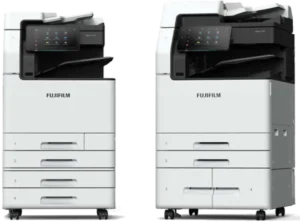
This model is designed for high-volume environments like administrative centers or large outpatient clinics.
- Print Speed: Up to 70 pages per minute (ppm)
- Scan Speed: Up to 270 images per minute (ipm) with duplex scanning
- High-resolution printing: 1200 x 2400 dpi
- Advanced faxing capabilities with legacy and modern integration
- Strong security features with user authentication and secure print
Ideal for: Facilities that process large volumes of patient documents, insurance forms, and clinical data.
Apeos C8180 / C7580 / C6580 Series

These high-end models are built for environments requiring premium output and advanced finishing.
- Print Speed: Up to 81 ppm
- Scan Speed: 270 ipm with 1-pass duplex scanning
- Print resolution up to 2400 x 2400 dpi
- Supports long-sheet printing, advanced stapling, and booklet finishing
- Integrated cloud and mobile support
Ideal for: Hospitals and clinics that produce patient education materials, large-format posters, and internal signage.
Apeos C5240

A compact yet powerful A4 device, ideal for smaller departments or satellite clinics.
- Print Speed: 52 ppm
- Scanning: 83 ipm with a 100-sheet duplex automatic feeder
- Mobile print and scan support with flexible configuration
Ideal for: Remote clinics or specialty practices with limited space but moderate document needs.
Functional Benefits for Healthcare
Across the Apeos product family, several features align especially well with healthcare workflows:
- Intuitive User Interfaces: Devices are designed for fast, simple use—reducing training time and enabling staff to focus more on patients.
- Mobile Printing: Staff can print directly from smartphones and tablets using standard mobile protocols or dedicated apps.
- Scan-to-Email and Folder: Direct scanning reduces manual steps and integrates documents into patient records seamlessly.
- Touchless Authentication: Card readers and mobile ID access minimize shared contact surfaces and improve access control.
- Secure Fax Transition: Maintain faxing while transitioning to more secure, cloud-based or email workflows.
- Audit Trails: Track and log document access and transmission to ensure accountability.
- Energy Efficiency: Devices feature energy-saving technologies and quick recovery modes, supporting sustainability goals.
Moving Away from Traditional Fax
Fax is still a staple in healthcare, but traditional machines are increasingly seen as risk-prone and outdated. Common issues include misdirected faxes, unsecured outputs, and lack of audit trails. While faxing isn’t inherently non-compliant, it must be managed within HIPAA requirements.
Modern Apeos MFPs support secure, digital fax alternatives. These allow:
- Faxing directly from the MFP without printing first
- Encryption of fax transmissions
- Storage of sent/received faxes with access controls
- Integration with cloud fax services and secure email platforms
By transitioning away from analog fax machines, you reduce paper waste, increase transmission reliability, and support modern healthcare IT infrastructure.
What to Expect in 2026
Several developments on the horizon make 2026 a pivotal year for healthcare documentation:
- Tighter HIPAA Enforcement: Expect greater scrutiny of digital and paper document handling. Devices that lack encryption, authentication, or access control will become liabilities.
- Sunset of Legacy Fax Systems: More carriers and systems are phasing out support for analog fax lines. Cloud or IP-based alternatives will be required.
- Increased Mobile Staff: Remote clinics, telehealth, and decentralized staff models mean print/scan devices must support mobile access and secure cloud integration.
- Interoperability Mandates: Document workflows will need to interface with EHRs and other clinical systems in real time.
- Sustainability Targets: Environmental goals will push facilities to use energy-efficient, multi-function devices with minimal waste.
Upgrading now positions your facility to meet these changes proactively rather than reactively. It also gives you ample time to roll out new workflows, train staff, and optimize ROI.
The Role of Mobile Print in Healthcare
Mobile printing and scanning play an increasingly central role in modern healthcare operations:
- On-the-Go Printing: Staff can print patient instructions, referrals, and forms from tablets or phones directly to the nearest MFP.
- Remote Access: Clinicians working remotely or in field clinics can securely send documents to centralized printers.
- Touch-Free Interaction: Using mobile apps or NFC-enabled phones, staff can authenticate and operate devices without physical contact.
- Scan to Anywhere: Documents can be scanned and sent directly to secure folders, email addresses, or cloud storage, improving access and reducing latency.
- Reduced IT Burden: Mobile printing solutions often eliminate the need for installing local drivers, easing administrative overhead.
These capabilities are no longer luxury features. They’re vital to supporting mobile care models, improving efficiency, and ensuring security across every touchpoint.
How to Plan Your Upgrade
Upgrading your MFPs is a process that benefits from clear planning and alignment across departments. Here’s a smart upgrade path:
- Audit Your Current Devices: Inventory every print, scan, and fax device across all departments. Note their age, reliability, and feature gaps.
- Map Your Workflows: Understand how documents flow through your facility—from patient intake to referral letters—and where delays or compliance risks arise.
- Choose the Right Models: Match device capabilities to your specific needs. High-volume models for busy departments, compact models for satellite offices.
- Engage IT and Compliance: Ensure the new devices meet internal security standards, integrate with networks, and align with data governance policies.
- Pilot and Train: Start with one or two departments, train users on new features, and collect feedback before full deployment.
- Phase Out Legacy Equipment: Decommission old fax machines and unsupported printers to reduce clutter, maintenance costs, and risk.
- Track Success Metrics: Monitor improvements in workflow speed, security incidents, print volume, and staff satisfaction to ensure ROI.
Start with Your Fujifilm Demo Today!
By upgrading to FUJIFILM Apeos devices before 2026, you position your healthcare facility for smarter, safer, and more efficient operations. These aren’t just printers—they’re powerful workflow tools that help you manage sensitive data, support a mobile workforce, and meet evolving regulatory demands.
Now is the time to:
- Evaluate your current fleet and document challenges
- Plan for regulatory and workflow changes on the horizon
- Select modern, secure devices that grow with your facility
If you’re ready to upgrade or want help mapping the right device to your needs, connect with ABT, we understand healthcare workflows and the Colorado landscape. With the right Apeos device in place, you can eliminate bottlenecks, improve compliance, and prepare for a future of more mobile, integrated, and patient-focused care.