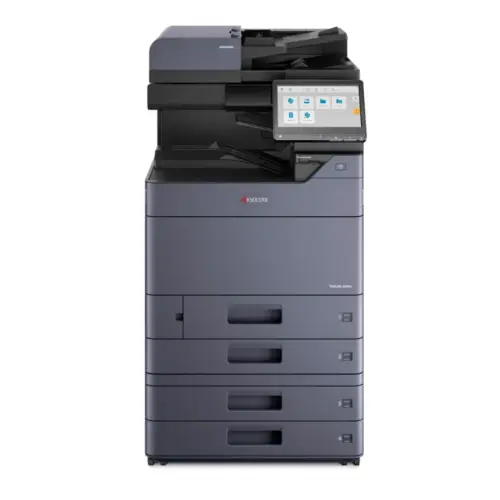
TASKalfa 2554ci (25 ppm)
Great for smaller teams that still need professional color and scan workflows.
Get the brochureKyocera Document Solutions • Colorado
If you’re upgrading print and scan for a busy team, TASKalfa devices are designed for high-demand office environments that need speed, precision, finishing flexibility, and security-minded document handling. ABT helps you right-size the model, install it cleanly, and support it locally across Colorado.
Tip: bring 3–5 real documents to your demo (packets, forms, color pages, and a scan workflow).
You’re not shopping for “a copier.” You’re protecting uptime, improving scan workflows, and keeping print costs predictable. The TASKalfa line is built for shared departments and mid-to-large workgroups that need consistent performance across print, copy, and scan—plus the finishing options that reduce manual collation and rework.
When multiple users hit the device all day, the right engine speed and paper capacity prevent bottlenecks. We’ll map your monthly volume, peak weeks, and finishing needs before recommending a model.
TASKalfa devices support practical controls like authentication, encrypted communication, and policy-minded configurations—so your print/scan endpoint aligns with how your organization manages access and risk.
Stapling, hole-punching, booklet making, and high-capacity output can turn a weekly “two-hour packet build” into a few clicks—especially for HR, legal, education, and admin teams.
Get a demo with your real documents and a recommendation based on volume, workflows, and security needs.
Start with the workflow you’re trying to improve—then match engine class to volume. Below is a practical way to shortlist models quickly. If you want the fastest path to a recommendation, request a demo and share your monthly page counts and scan destinations.
Great for smaller teams that still need professional color and scan workflows.
Get the brochureSolid step up for busier departments that need faster throughput and shared use.
View spec sheetA common “sweet spot” for mixed print/copy/scan with finishing flexibility.
View spec sheetDesigned for heavier daily usage—ideal when multiple teams rely on one device.
View brochure/specWhen speed and black-and-white throughput matter most (forms, packets, internal docs).
See Kyocera device listBuilt for demanding environments with serious output needs. Highlights include a 10.1” color touch panel, professional finishing options, and robust security capabilities (authentication, encrypted protocols, integrity checks).
View spec sheetWhen you need higher speed color output and finishing for complex deliverables.
Get brochureFor extremely high B&W throughput where uptime and scale are non-negotiable.
Get brochureNot sure which tier fits? Tell us your monthly volume, color vs. B&W, and scan destinations.
Get My TASKalfa RecommendationHardware is only half the story. Most “copier frustration” comes from the environment: scan destinations, driver standards, inconsistent settings, unclear ownership, and reactive support. ABT helps you build a repeatable standard—so your users get a consistent experience and you get fewer interruptions.
We’ll set up the common paths (scan-to-email, folders, SharePoint, and other destinations) and create simple, button-driven actions—so scanning becomes fast and consistent.
If a device goes down, you need clear next steps—fast triage, onsite repair when required, and a plan to reduce repeat issues over time.
You get Colorado-based support and a team that understands how Front Range and Southern Colorado businesses actually operate—multi-site offices, compliance requirements, and the need for fast response when printing stops.
Address: 11999 E. Caley Ave, Suite A, Centennial, CO 80111
Phone: (303) 778-0600
Address: 12000 N Pecos St, Suite 330, Westminster, CO 80234
Phone: (720) 389-2460 • (303) 778-0600 (main dispatch)
Address: 1047 Elkton Dr, Colorado Springs, CO 80907
Phone: (719) 434-4080
Northern / Denver Metro: Denver, Centennial, Aurora, Lakewood, Thornton, Broomfield, Westminster, Boulder and nearby corridors.
Southern Colorado: Colorado Springs, Pueblo, Monument, Fountain, Woodland Park and surrounding communities.
If you’re unsure about coverage at your site (or you have multiple locations), request a demo and tell us where your devices live.
Start with monthly volume, peak periods, and the workflows that matter most (scan destinations, finishing, and security). If you share those, ABT can narrow your shortlist quickly and confirm fit with a demo using your real documents.
Yes—secure release (badge/PIN), authentication, and policy-minded configurations are common asks, especially in healthcare, legal, finance, and multi-site organizations.
If printing is stopped or scan-to-email fails, request service with your make/model and symptoms. Remote support can handle many driver and destination issues, and onsite repair is available when parts or hardware work is needed. See service options here.
Get a Kyocera demo, right-size your model, and lock in local Colorado support so your team stays productive.