You know how it goes. The server goes down at 8:47 on a Tuesday morning. Fifteen people can’t work. Someone finds a tech who can be there by noon — maybe. Four hours of labor, a replacement part, and a lot of lost productivity later, you’ve got a bill that makes your eyes water.
That’s break-fix IT. And for a lot of Colorado small businesses, it’s still the default — not because it’s the smartest option, but because it feels like the cheaper one.
This post is for business owners with 10 seats or more who want an honest look at what each model actually costs — not just the line on the invoice, but the real number when you factor in downtime, risk exposure, and the labor rates that don’t come cheap after 5 p.m.
Two Models. Two Very Different Risk Profiles.
Before we get into dollars, let’s define what we’re actually comparing.
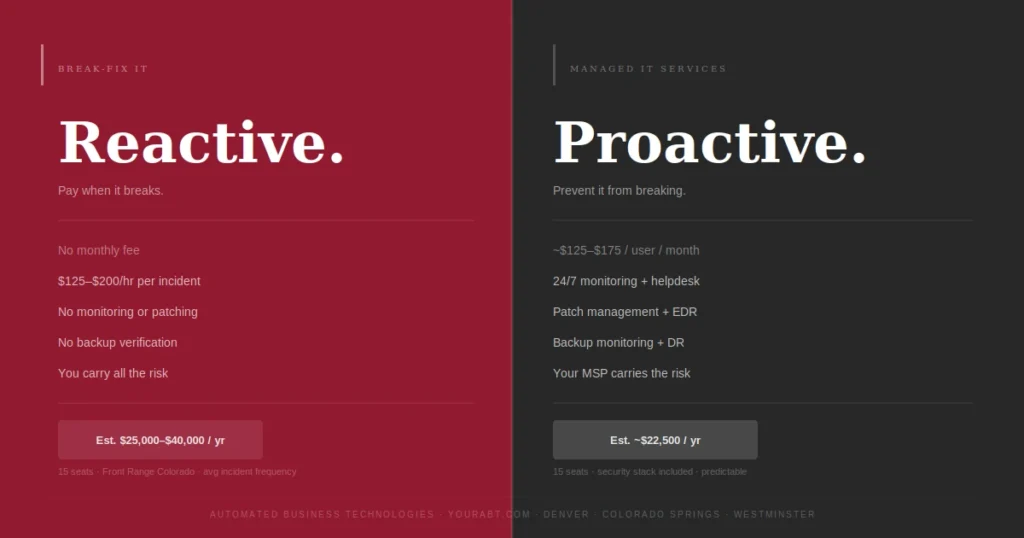
Break-fix IT is reactive. Nothing is monitored. Nothing is patched on a schedule. When something fails, you call someone, they show up (eventually), fix the thing that broke, and invoice you. There’s no ongoing relationship, no visibility into what’s coming next, and no one watching your network at 2 a.m. when ransomware starts encrypting your file server.
Managed IT services is proactive. You pay a flat monthly fee — typically per seat — and in return your infrastructure is monitored 24/7, patches are applied before vulnerabilities become exploits, your backup jobs are verified, and a helpdesk is available when your team runs into issues. Problems are often resolved before users even notice them.
The fundamental difference isn’t about cost. It’s about who carries the risk. In a break-fix model, you carry it. In a managed services model, you transfer a significant portion of it to a provider who is financially incentivized to keep things running.
Call when something breaks. Pay per incident.
$125–$200/hr labor • Parts at cost • Emergency rates after hours
You do. Unmonitored. Unpatched. No SLA.
Flat monthly fee. 24/7 monitoring. Proactive support.
$100–$175/user/mo • Predictable • Includes helpdesk
Your MSP does. They’re incentivized to prevent failures.
The Math on a 15-Seat Colorado Business
Let’s run real numbers on a hypothetical — but completely representative — Colorado business. Fifteen employees. Two servers. Cloud-based line-of-business application. Standard mix of desktops and laptops.
This is not a worst-case scenario. These are average incident frequencies and industry-standard labor rates for the Front Range market.
The break-fix column is not a worst-case number. It’s an average. And it doesn’t include the scenario that turns a bad year into a catastrophic one.
The Hidden Multiplier: What Downtime Actually Costs
Here’s where the break-fix math gets genuinely uncomfortable. Most business owners think of downtime as an inconvenience. The actual cost model is different.
When your systems are down, you’re not just paying the IT tech. You’re paying every employee in the building who can’t work. You’re paying in missed client deadlines. You’re paying in the sales calls that didn’t get returned, the orders that didn’t get processed, the proposals that didn’t go out.
The Ransomware Variable
We need to talk about the number that doesn’t show up in the average-case analysis.
Ransomware attacks on small and mid-sized businesses have increased significantly over the past three years. The reason SMBs are targeted is precisely because they tend to run unpatched systems, lack endpoint detection tools, and don’t have the monitoring infrastructure to catch an intrusion before it spreads.
In other words, break-fix IT environments are the preferred attack surface.
The average total cost of a ransomware incident for a small business — including downtime, recovery, data restoration, and legal/regulatory exposure — has been estimated at over $200,000. Many small businesses do not survive it. This is not a hypothetical risk. It is a statistical one, and the probability goes up meaningfully every month that endpoints go unpatched and network traffic goes unmonitored.
When Does Break-Fix Actually Make Sense?
To be fair to the break-fix model: it does have a use case.
For solo operators and very small shops — one to four people, minimal data sensitivity, low technology dependence — break-fix can be a reasonable fit. If your systems going down for a few hours doesn’t cost you much in productivity or revenue, and you’re not storing client data that carries regulatory exposure, the math can work in your favor.
Once you cross 10 seats, that calculus changes. At 10 or more users, you have enough concurrent risk — endpoints, credentials, email, shared storage, line-of-business applications — that reactive-only support stops being prudent. The more people relying on your systems, the more expensive every hour of unplanned downtime becomes.
What a Managed IT Services Agreement Actually Includes
One reason business owners resist the managed IT conversation is a suspicion that they’re paying for a vague promise. That’s a legitimate concern — not all MSP agreements are created equal. Here’s what a full-service managed IT contract from a reputable provider should include.
24/7 network and endpoint monitoring
Patch management (OS + third-party apps)
Helpdesk support with defined SLA response times
Backup monitoring and verified recovery testing
Endpoint detection and response (EDR)
DNS filtering and email security
Multi-factor authentication (MFA) enforcement
Quarterly technology review and roadmap
If a provider is quoting you a “managed IT” contract that doesn’t include patch management, backup monitoring, and a security stack, ask them specifically what happens when those gaps lead to an incident. The answer will tell you what you need to know.
Questions to Ask Any IT Provider Before You Sign
Whether you’re evaluating a managed IT services agreement or trying to get more out of a break-fix relationship, these are the questions that separate capable providers from expensive ones.
01.
02.
03.
04.
05.
The Colorado-Specific Factor
One detail that matters in any IT support conversation: geography. Colorado’s Front Range is not a single market. A managed IT provider serving Denver businesses out of a single downtown office is not the same as a provider with local dispatch capability in Colorado Springs and Westminster.
On-site response still matters. When a server physically fails, when a workstation won’t image remotely, or when you need a hands-on network assessment, remote support hits its ceiling. Ask any provider you’re considering specifically where their technicians are located and what their on-site response time is for your specific address — not for the Denver metro in general.
The Bottom Line
Break-fix IT is not free. It just hides its costs until they’re impossible to ignore. For a Colorado business with 10 or more employees, managed IT services almost always comes out ahead when you run an honest annual cost comparison — and that’s before you factor in the existential risk that comes with unmonitored, unpatched infrastructure.
The question isn’t really “can I afford managed IT services?” It’s “can I afford not to have it?”
If you want to see what this looks like with your actual headcount and infrastructure, ABT offers a no-cost IT assessment for Colorado businesses across Denver, Colorado Springs, and Westminster. We’ll tell you exactly where your gaps are and what it would cost to close them.