Canon imageCLASS X Series Printers in Colorado | ABT
Canon imageCLASS X Series • Colorado Sales, Demos & Support

Canon imageCLASS X Series Devices in Colorado

If your office has “too many little printers” (and not enough control), the imageCLASS X Series is built for you. These business-focused Canon A4 printers and compact MFPs help you standardize desktop and small workgroup printing, tighten security, and support hybrid users without turning print into a daily fire drill. ABT helps you choose the right models, plan deployment, and support your Canon fleet across Colorado.

Already have an imageCLASS device and need help? Use ABT’s Service Request.

Who buys imageCLASS X Series—and why?

imageCLASS X is ideal when you need enterprise-minded A4 devices for desks and small departments—without stepping up to a full A3 copier. That usually means you’re balancing productivity, security, and supportability across multiple users, roles, or sites.

IT Managers Office Managers Ops & Admin Teams AP / Finance HR Clinics & Intake Legal Education

If you’re standardizing Canon across the organization, connect this to your broader Canon device roadmap here: Canon Dealership in Colorado.

How ABT helps you deploy imageCLASS X

  • Right-sizing: printer vs MFP, color vs mono, and the right duty for each department
  • Workflow setup: scan profiles, default settings, address books, and destinations
  • Print controls: policies, user access, and reporting (where applicable)
  • Colorado support: a clear path for demos and service when you need help

For demos: ABT Demo Request • For service: ABT Service Request

Model Examples

Canon imageCLASS X Series options (with device images + brochures)

Canon refreshes model availability over time, so treat these as common reference points. ABT will confirm current availability and recommend the best-fit device for your Colorado workflow.
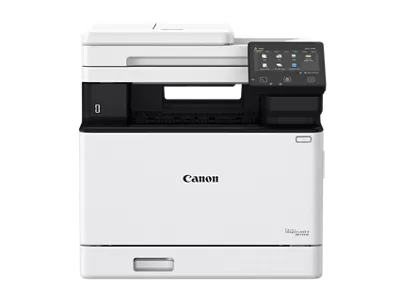

Color Multifunction (Print / Copy / Scan / Fax)

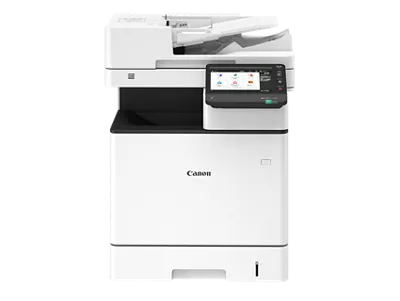
Canon Color imageCLASS X MF1538C II compact multifunction printer

Color imageCLASS X MF1538C II

For small-to-mid workgroups that need fast color plus scanning and a consistent UI.

  • Strong fit for HR onboarding, AP, intake, and daily scanning workflows
  • Choose this when you need one compact device to handle “most tasks”
  • Good for shared spaces where multiple users rely on quick walk-up use
Canon Color imageCLASS X MF1333C compact multifunction printer

Color imageCLASS X MF1333C

For smaller teams that want color plus scan/copy/fax in a compact footprint.

  • Great for front offices, admin teams, and departments with moderate volume
  • A practical fit when you want color without overbuying capacity
  • Good “branch office” device when standardization matters
ABT Canon solutions in Colorado

Need a fleet-friendly approach?

If you’re deploying multiple devices, focus on consistency: defaults, permissions, scan destinations, and support.

  • Standardize “scan profiles” so users stop improvising
  • Align desktop devices with your main copier UX where possible
  • Use a demo to validate real workflows, not just specs

Black-and-White Multifunction

Canon imageCLASS X MF1440 black-and-white compact multifunction printer

imageCLASS X MF1440 (B&W MFP)

For departments that scan and copy daily but don’t need color on that device.

  • Great for legal packets, forms, contracts, and operational workflows
  • Choose this when reliability and speed matter more than color output
  • Ideal as a “department hub” for B&W plus scanning
ABT service and support for Canon devices in Colorado

Need help fast?

If your team is blocked by printing or scanning issues, use ABT’s service pathway.

  • Submit a service request for device issues or troubleshooting
  • Ask about standard scan destinations and default settings while you’re at it
  • Reduce repeat issues with a fleet plan via MPS
ABT Canon Colorado support and workflows

When mono MFPs win

Mono devices can be the most cost-predictable way to support heavy packet printing and scanning.

  • Best for high B&W volume: forms, policies, packets, training materials
  • Keep color on a separate device if it’s occasional or marketing-only
  • Standardize defaults so departments stop “tweaking settings”

Single-Function Printers (Print Only)

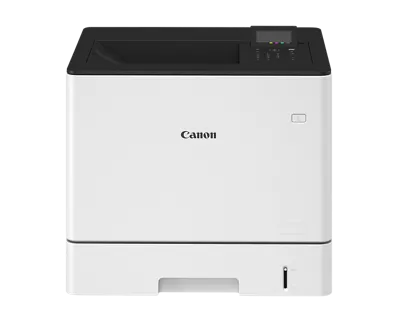
Canon Color imageCLASS X LBP1538C II single-function printer

Color imageCLASS X LBP1538C II

For small workgroups that primarily print and want fast, consistent color in a compact unit.

  • Great for desks and departments that don’t need scan/copy at that device
  • Ideal when you want to keep workflow simple (print-only)
  • Pairs well with a shared scanner or a centralized MFP
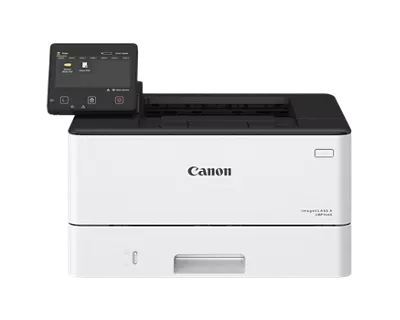
Canon imageCLASS X LBP1440 black-and-white single-function printer

imageCLASS X LBP1440 (B&W Printer)

A compact mono printer for dependable daily output—forms, packets, and internal documents.

  • Great for admin stations, back offices, and teams that print frequently
  • Choose this when you want simple, fast B&W printing
  • Pairs well with a shared MFP for scanning workflows
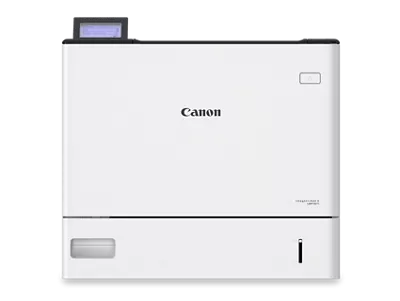
Canon imageCLASS X LBP1861 high-speed black-and-white workgroup printer

imageCLASS X LBP1800 Series (LBP1871 / LBP1861)

For high-volume workgroups that need speed and capacity without stepping up to an A3 copier.

  • Best for centralized B&W output: packets, manuals, training, forms
  • Great when a department “outgrows” typical desktop printers
  • Ideal for offices that need high throughput but want a compact footprint
FAQ

imageCLASS X Series questions Colorado teams ask

Should I standardize imageCLASS X at desks or keep shared devices only?

If users print frequently (or you have hybrid staff who need a dependable “nearby” device), desk-side or small workgroup devices can reduce congestion and improve productivity. If your goal is tighter control, consolidate to fewer devices with clear print policies. ABT can help you find the balance based on real usage and support load.

How do I choose between color and mono?

Put color where it drives value (client-facing packets, marketing, proposals) and keep mono where it’s purely operational. Many teams run a mixed fleet: a few color hubs plus mono workhorses in high-volume departments.

What’s the fastest way to get a recommendation?

Submit a request on the demo page with: estimated monthly volume, percent color, number of users, and whether scanning is required. Start here: ABT Demo Request.

How do I get service if something goes wrong?

Use ABT’s Service Request so your issue is routed correctly and you can get help quickly.

Next Step

Get an imageCLASS X recommendation your team will actually like

Tell ABT how many users you have, how much you print, whether you need color, and whether scanning is part of your daily workflow. We’ll map you to the right imageCLASS X devices and a rollout plan that reduces support burden.

Tip: If you’re evaluating multiple devices, ask ABT about standard defaults (duplex, color rules, scan profiles) to reduce change management.

What to include in your request

  • Monthly volume estimate and percent color
  • Printer vs MFP need (do you scan/copy daily?)
  • Number of users and locations
  • Security needs (PIN/card release, policies)
  • Scan destinations (email, folders, systems)

ABT will recommend the right mix of devices—so the fleet works as a system.